GitHub 上に新しいリモートリポジトリを作成
githubにアカウントを作成されている事が前提ですが、今回は例題として以下情報でGitHub に新規リポジトリを作成します。
| 設定項目 | 今回の設定値 | 備考 |
|---|---|---|
| リポジトリ名 Repository name | code-transformer-api | アンダーバーも使えるのだけれど、MavenのartifactIdは使えず、ハイフンが慣例になっているのでハイフン使う事おススメします。 |
| Description | マルチフォーマット対応のエンコード・デコード Web API | ご自由にどうぞ |
| Public/Private | Public | Privateにすると当然本人しか見る事ができません |
まずはGitHub にログインしての作業です
- New repository をクリック
- Repository name に
code-transformer-apiと入力 - Description に マルチフォーマット対応のエンコード・デコード Web API
- Public / Private を選択
- README, .gitignore, License は作らない(後でローカルから push するため)
入力例
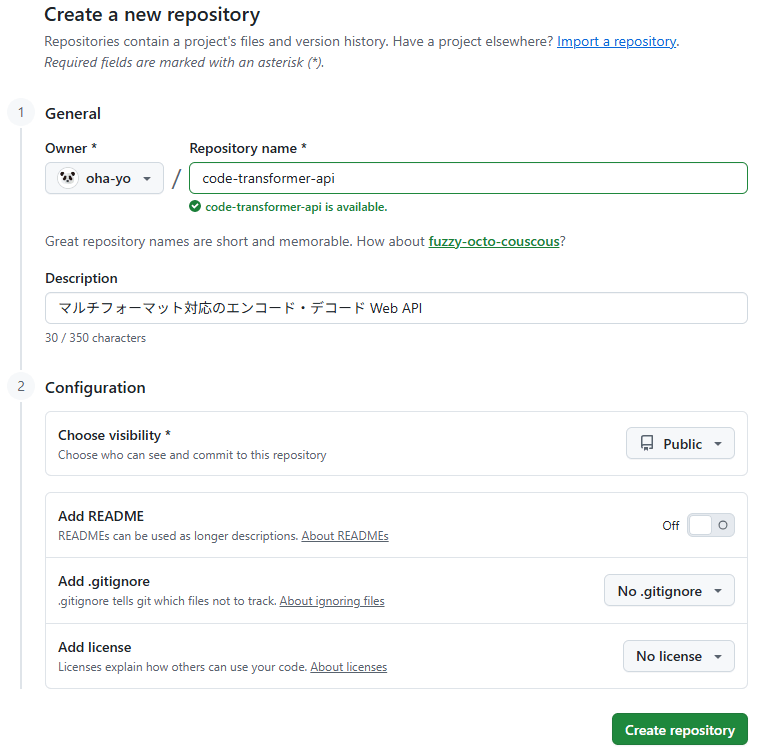
次に Create repository をクリック
すると、GitHub が push 用のコマンドを表示してくれる。これにならって、以下作業すすめる。
ローカルの Maven プロジェクトを Git 管理にする
プロジェクトのルートディレクトリで以下を実行
カレントフォルダをローカルリポジトリ化する
これを実行する事で.git フォルダが作成されます。普段は見えていません(git bashやTortoiseGitが.gitフォルダを作成しても「Hidden 属性」を付けているためです)
git init
.gitattributesファイルを適宜編集して各種ファイルの改行コードの扱いを定義
おおよその条件下ではデフォルトのままで大丈夫と思いますが、こだわる方は以下どうぞ

.gitignoreファイルを適宜編集しgit管理不要対象を記載します
こちらもほぼデフォルトで大丈夫ですが、たまにgitにあがってしまっては困るものもあるので注意しましょう。
カレントディレクトリ配下の変更を「ステージングエリア」に載せる
git add . は、カレントフォルダ配下の「新規・変更・削除されたファイル」を.gitignore のルールに従って選別し、次のコミットに含めるための “ステージングエリア” に登録します。
ここで注意したいのは、ステージングエリアは実体のあるフォルダではないという点です。実際には .git/index という Git の内部データに、「次のコミットに入れるファイルのリスト」として記録されているだけです。
git add .
現状をスナップショット
以下コマンドはステージングエリアに登録されている内容を“スナップショットとして確定” し、そのコミットにメッセージを付ける操作です。ステージングエリアの内容がそのまま履歴として保存されます。
git commit -m "Initial commit"
GitHub リポジトリと接続する
ローカルリポジトリに “origin” という名前でGitHub 上のリポジトリ URL を登録するコマンドです。これにより、今後 git push でどこに送るかを Git が理解できるようになります。この時点ではまだアップロードは行われません。
git remote add origin https://github.com/<your-account>/code-transformer-api.git
ここまでの実行例
sooni@mahirospc MINGW64 /c/work/code-transformer-api
$ pwd
/c/work/code-transformer-api

sooni@mahirospc MINGW64 /c/work/code-transformer-api
$ git init
Initialized empty Git repository in C:/work/code-transformer-api/.git/

sooni@mahirospc MINGW64 /c/work/code-transformer-api (main)
$ git add .
warning: in the working copy of '.gitattributes', LF will be replaced by CRLF the next time Git touches it
warning: in the working copy of '.gitignore', LF will be replaced by CRLF the next time Git touches it
warning: in the working copy of '.mvn/wrapper/maven-wrapper.properties', LF will be replaced by CRLF the next time Git touches it
warning: in the working copy of 'mvnw.cmd', LF will be replaced by CRLF the next time Git touches it
warning: in the working copy of 'pom.xml', LF will be replaced by CRLF the next time Git touches it
warning: in the working copy of 'src/main/java/com/oha_yo/codec/Application.java', LF will be replaced by CRLF the next time Git touches it
warning: in the working copy of 'src/main/java/com/oha_yo/codec/unicode/UnicodeController.java', LF will be replaced by CRLF the next time Git touches it
warning: in the working copy of 'src/main/java/com/oha_yo/codec/unicode/UnicodeService.java', LF will be replaced by CRLF the next time Git touches it
warning: in the working copy of 'src/main/resources/application.properties', LF will be replaced by CRLF the next time Git touches it
warning: in the working copy of 'src/test/java/com/oha_yo/codec/ApplicationTests.java', LF will be replaced by CRLF the next time Git touches it

sooni@mahirospc MINGW64 /c/work/code-transformer-api (main)
$ git commit -m "Initial commit"
[main (root-commit) 1d07fb2] Initial commit
 13 files changed, 676 insertions(+)
 create mode 100644 .gitattributes
 create mode 100644 .gitignore
 create mode 100644 .mvn/wrapper/maven-wrapper.properties
 create mode 100644 logs/api-server.loZg
 create mode 100644 logs/api-server.log
 create mode 100644 mvnw
 create mode 100644 mvnw.cmd
 create mode 100644 pom.xml
 create mode 100644 src/main/java/com/oha_yo/codec/Application.java
 create mode 100644 src/main/java/com/oha_yo/codec/unicode/UnicodeController.java
 create mode 100644 src/main/java/com/oha_yo/codec/unicode/UnicodeService.java
 create mode 100644 src/main/resources/application.properties
 create mode 100644 src/test/java/com/oha_yo/codec/ApplicationTests.java

sooni@mahirospc MINGW64 /c/work/code-transformer-api (main)
$
git add でwarning が出ているのは、プロジェクト内のファイルが LF で保存されているのに、 Git の設定が チェックアウト時に CRLF に変換するようになっているため、 「次に Git が触ったら CRLF に変えるよ」と警告しているだけ。このままでも問題ないけど、.gitattributesファイルを書き換えることで対策することできます。
ローカルのブランチ名を mainに変える
git branch -M main
ローカルと GitHub を接続する
git remote add origin https://github.com/oha-yo/code-transformer-api.git
main ブランチを GitHub に push
これで GitHub にアップロードされますが、-u オプションの意味も理解しておきましょう。
git push -u origin main
ここまでの実行例
$ git branch -M main

atsuc@mahirospc MINGW64 /c/work/code-transformer-api (main)
$ git remote add origin https://github.com/oha-yo/code-transformer-api.git

atsuc@mahirospc MINGW64 /c/work/code-transformer-api (main)
$ git push -u origin main
Enumerating objects: 31, done.
Counting objects: 100% (31/31), done.
Delta compression using up to 16 threads
Compressing objects: 100% (21/21), done.
Writing objects: 100% (31/31), 10.91 KiB | 1.36 MiB/s, done.
Total 31 (delta 1), reused 0 (delta 0), pack-reused 0 (from 0)
remote: Resolving deltas: 100% (1/1), done.
To https://github.com/oha-yo/code-transformer-api.git
 * [new branch]      main -> main
branch 'main' set up to track 'origin/main'.

atsuc@mahirospc MINGW64 /c/work/code-transformer-api (main)
$
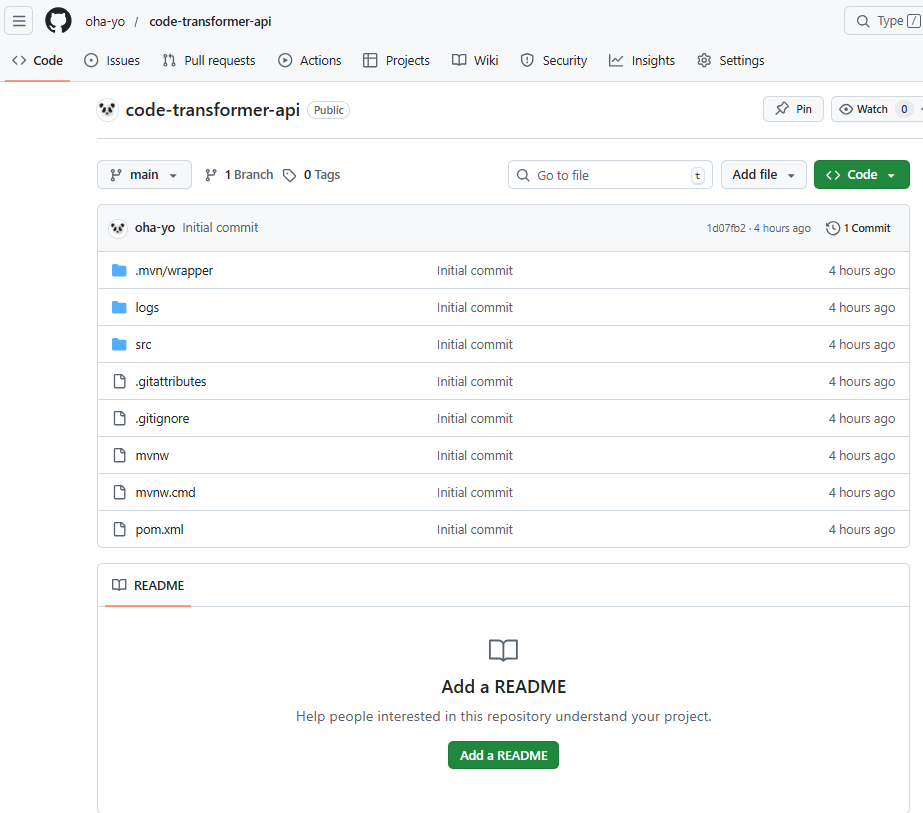
登録の確認
以下の通り登録できた事確認できます。できたと思ったら、意図せず「logs」フォルダも登録されていました。本来.gitignoreファイルを使って登録対象から外すものですね。一度gitに登録したものを今後GITの管理から外す方法はこちら